
Using NABS Confidence
Objectives and assessments
An objective says what the team is aiming for. Each retro checks the objectives you chose for it. The team records the verdict. For the reason this exists, see Why objectives.
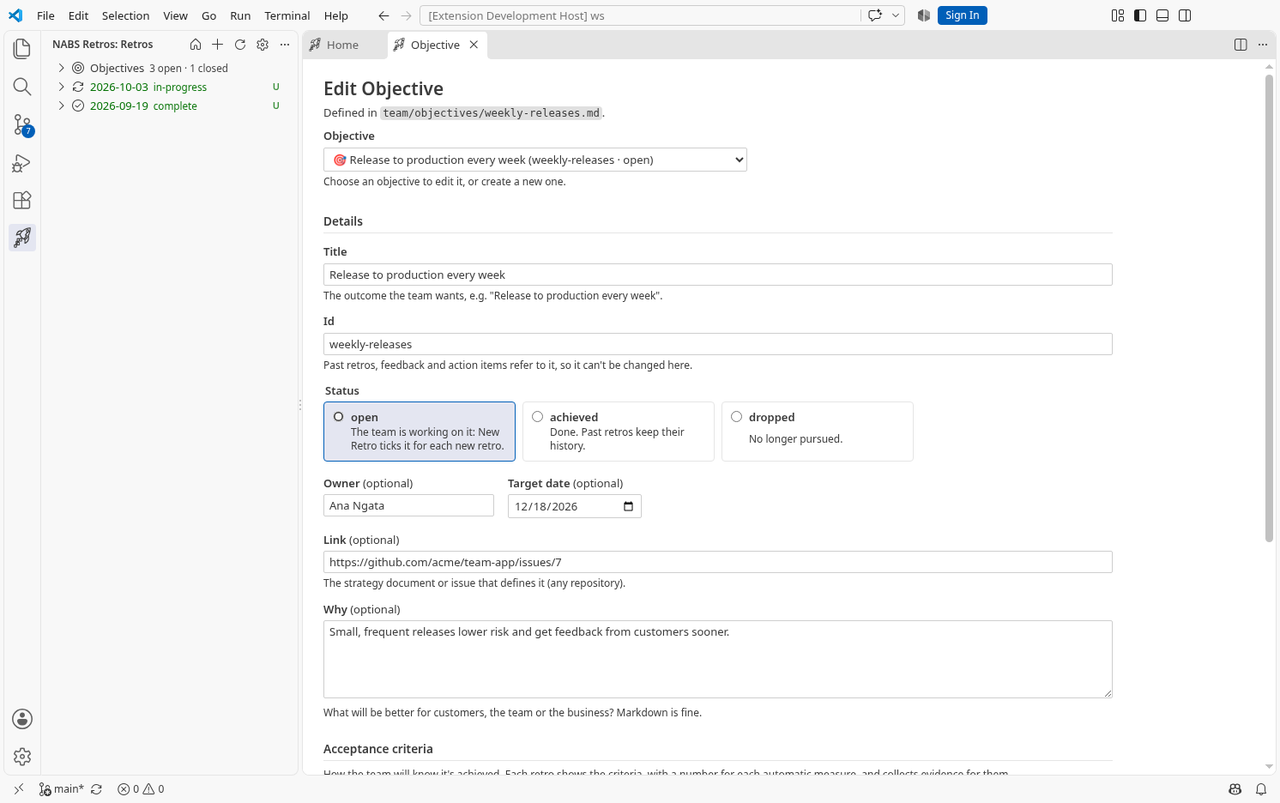
Create one
- Run NABS Confidence: New Objective…, or use Objectives on Home.
- Give it a title. The id is made from the title if you leave it empty. Use lowercase letters, digits and hyphens, up to 40 characters. Do not rename an id once retros refer to it.
- Set the status: open, achieved or dropped. Owner, target date, link and why are optional.
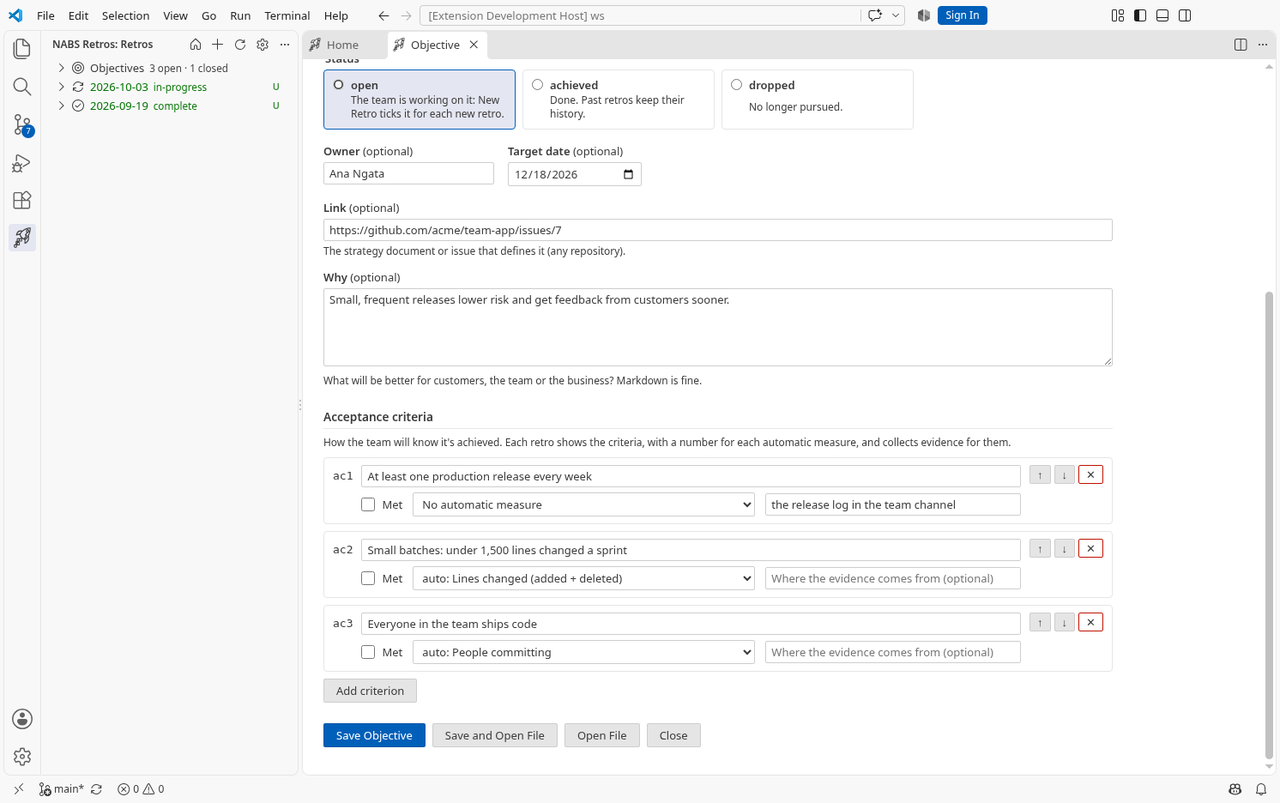
- Add acceptance criteria. Reorder or remove them, tick Met when a criterion is met, and optionally choose an automatic measure.
- Save. The file is
team/objectives/<id>.mdunless you changednabsConfidence.objectivesFolder.
Automatic measures
A measure is a number for the retro’s period, from data the extension already collects. If the data is missing, the measure is marked unavailable and no number is invented. Analyse / Refresh Insights recalculates them.
| Id | What it counts |
|---|---|
commits | Commits |
authors | People committing |
files-changed | Files changed |
lines-changed | Lines changed (added plus deleted) |
prs-opened | Pull requests opened |
prs-merged | Pull requests merged |
prs-open | Pull requests still open at the end of the period |
pr-merge-hours | Median hours from opening a pull request to merging it |
issues-opened | Issues opened |
issues-closed | Issues closed |
issue-close-days | Median days from opening an issue to closing it |
The four Git measures need a Git repository. The pull request and issue measures need nabsConfidence.includeGitHub, a github.com remote, and a GitHub sign-in. There is no measure for deploys, incidents or tickets.
Choose them for a retro
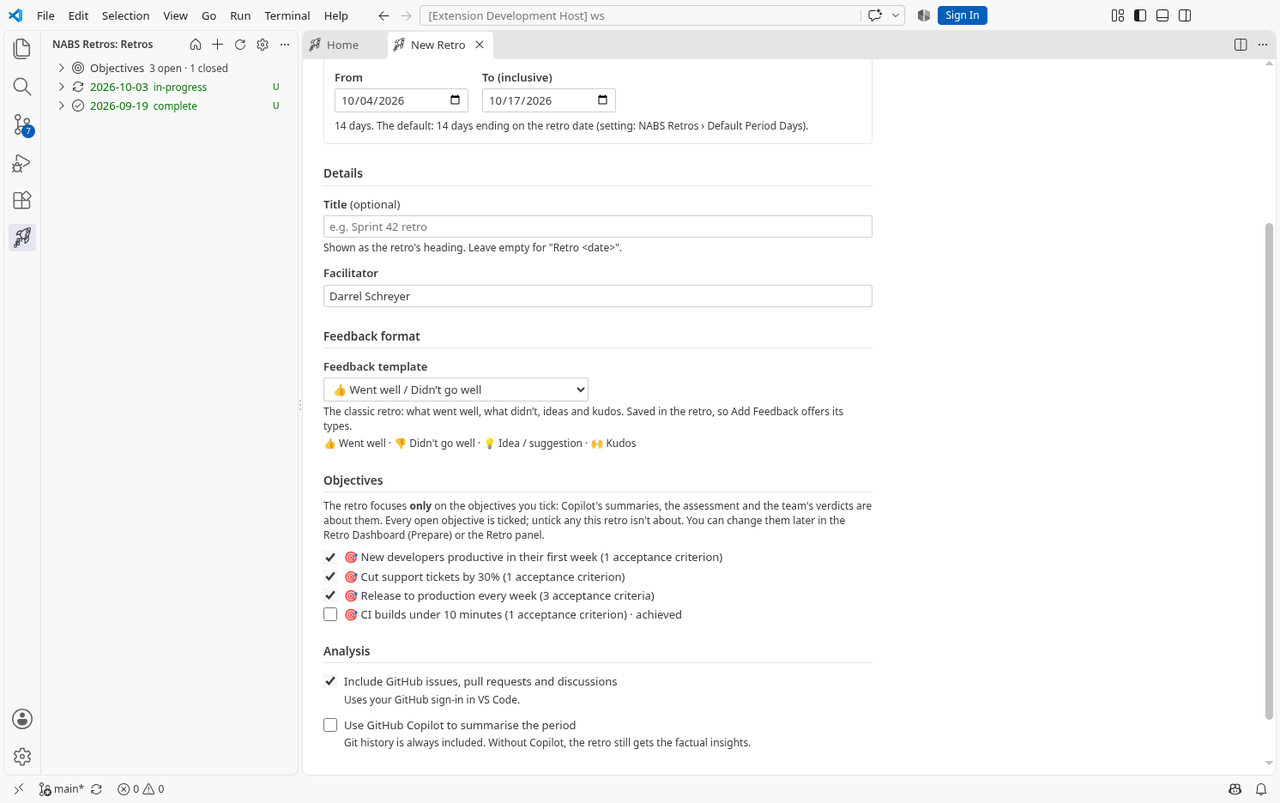
New Retro lists every objective. Open ones start ticked. You can change the set later on the dashboard’s Prepare stage, or in the Retro panel, and click Save Objectives. Unticking an objective that already has evidence, an assessment or a verdict asks you to confirm that those records go too. Objectives you keep hold their records. Newly added ones get measures for this retro’s period.
NABS Confidence: Choose Retro Objectives… opens Prepare.
Evidence, assessment, verdict
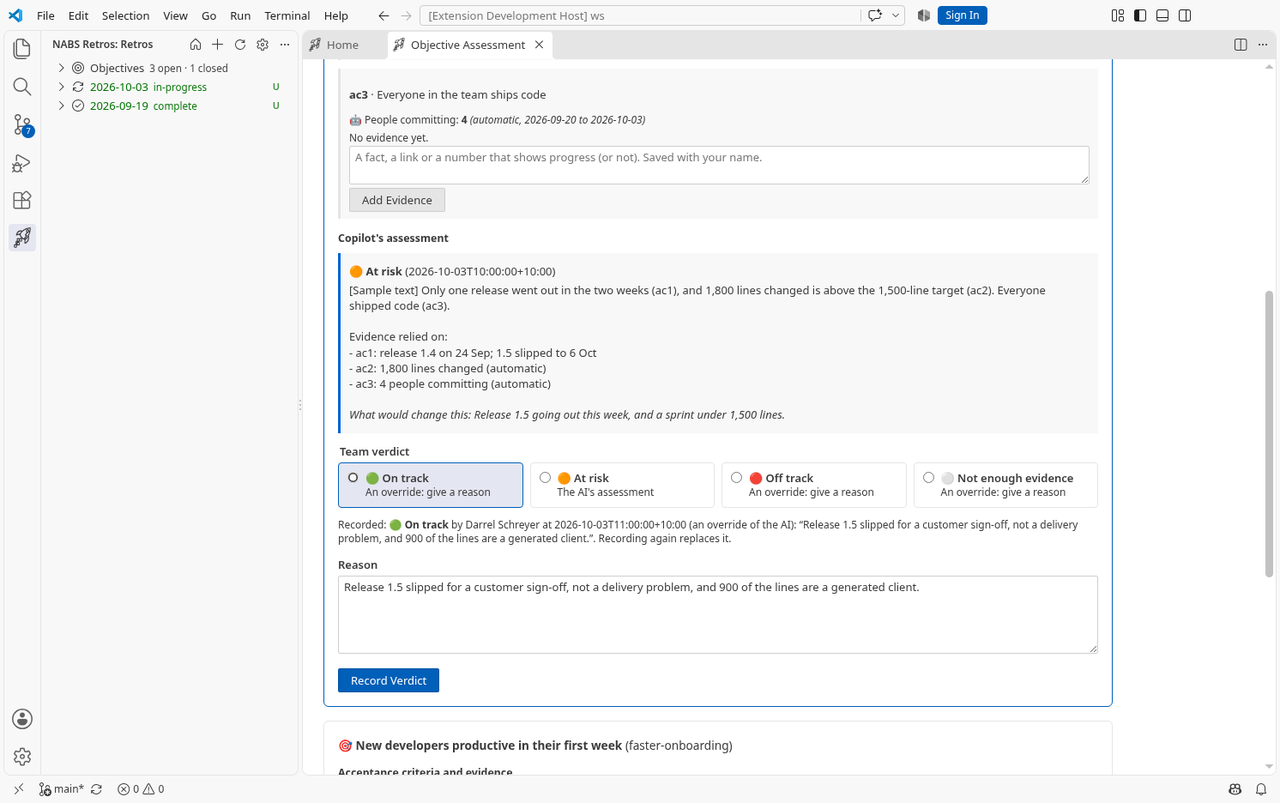
Open NABS Confidence: Objective Assessment… from the command, from a retro’s objective in the tree, from Home’s Assess, or from the dashboard’s Objectives stage.
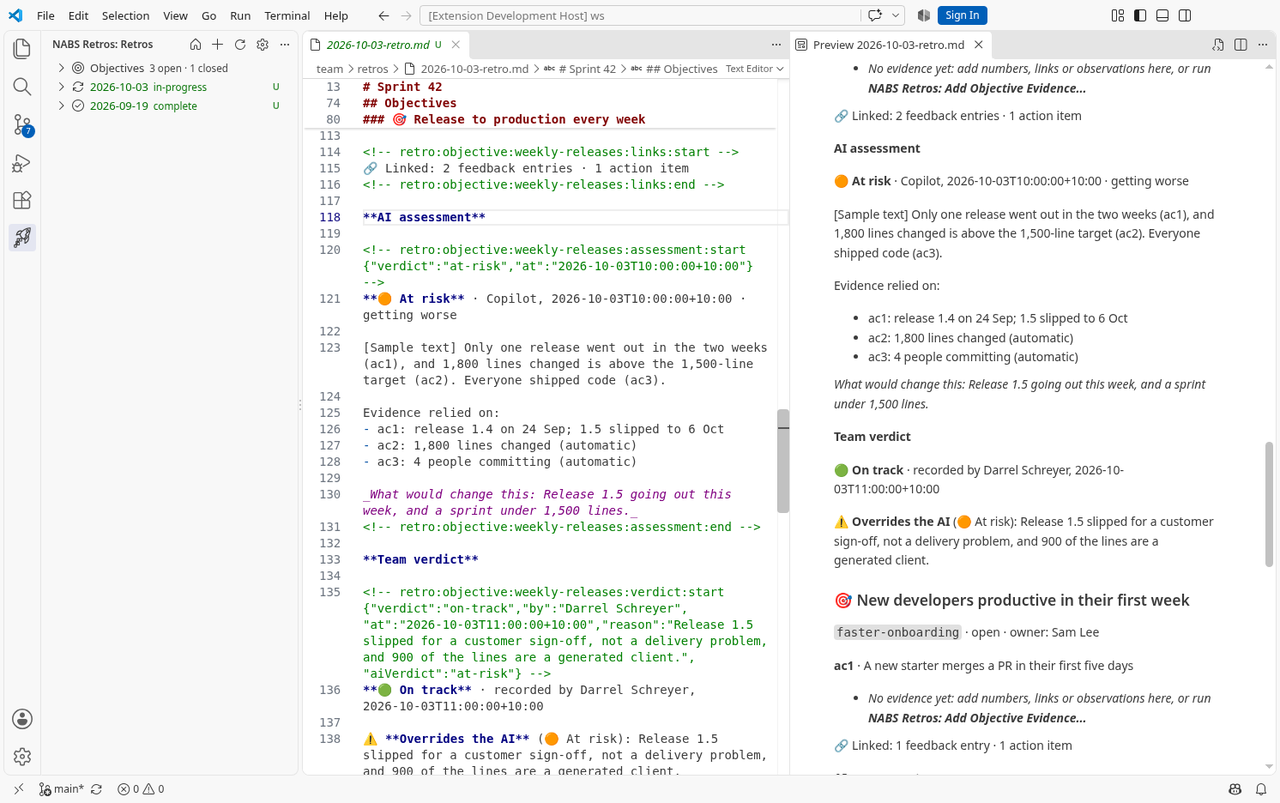
- Under a criterion, write what the team is counting as evidence and click Add Evidence. Your name and the date are stored with it. The automatic measure sits next to that evidence. A Linked line counts feedback entries and action items tagged to the objective. Those counts refresh when you summarise, assess or refresh insights, not on every keystroke.
- Run Assess Objectives with Copilot when you want a suggestion. It needs
nabsConfidence.useAIand a Copilot model. It reads the criteria, the measures, the evidence, linked feedback and actions, the previous retro’s assessment and verdict, and the period’s insights. It suggests on track, at risk, off track, or not enough evidence. It does not run by itself. See what it is instructed to do, and why you still read the result. - Record Objective Verdict… is the team’s call. Anyone with the repository can record it. The four choices are the same four. If your choice differs from Copilot’s, a reason is required. The retro keeps both, and shows that the team overrode the suggestion, with the reason. Recording again replaces the verdict in this retro. Assessing again replaces Copilot’s text in this retro. Earlier retros keep their own copies.
Linking feedback and actions
The Add Feedback form can attach an entry to one of the retro’s objectives. An action item links with #obj:<id> in its text. A GitHub issue created from that item gets a label objective:<id>. The Retro panel points out an action tagged with an objective the retro does not cover.
Release confidence as a measure
An acceptance criterion can use a measure from the release reports saved in catalogue/reports/: the newest score, how far it moved, how many releases in a row reached 80, or the level of one activity of the catalogue (release.activity.<id>.level, listed by the activity's title in the objective form). A new retro also gets a section Release confidence since the last retro in its Insights: the score at the start and the end of the period, the trend, and the activities whose level changed. Only reports somebody saved and committed are read; nothing is live.
Objectives that are GitHub issues
nabsConfidence.objectiveSources defaults to files only. Add issues for this repository, or issues:owner/repo for another repository, such as a strategy repo. The label defaults to objective. An open issue is an open objective. Closed as completed is achieved. Closed as not planned is dropped. The form shows an issue objective read-only, with Open Issue on GitHub. Issues are cached for a short time, and the last ones read are used when GitHub is offline. When two sources share an id, the earlier source in the list wins.
Coming soon. The dashboard’s Objectives stage has no guided view yet. It opens this panel. There is no leadership digest and no trend across retros.