
Using NABS Confidence
Action items and GitHub issues
Decide is where the team agrees a few actions that someone owns. The guided view of that stage is not built yet. The Retro panel and the retro file are where the work happens today.
Coming soon. The dashboard’s Decide stage says guided view coming. It links to Action Items in the Retro Panel and to the retro document. Use those.
Write an action
In the retro’s action items section, write a task list. A useful line looks like this:
- [ ] Quarantine the flaky checkout test @sam due: 2026-10-17 #obj:weekly-releases- [ ]is open.- [x]is done.@loginis the owner. When you create a GitHub issue, those logins are the assignees.due: YYYY-MM-DDis the due date, copied onto the issue.#obj:<id>links the action to an objective. The issue gets a labelobjective:<id>.#act:<id>links the action to an activity of the release catalogue. The issue gets a labelactivity:<id>, and the dashboard lists the activity with its level in the newest saved release report. Write the same tag in a feedback entry to link that.
Two or three owned actions are the point. The stage help on the dashboard says to stop at three.
Create the GitHub issues
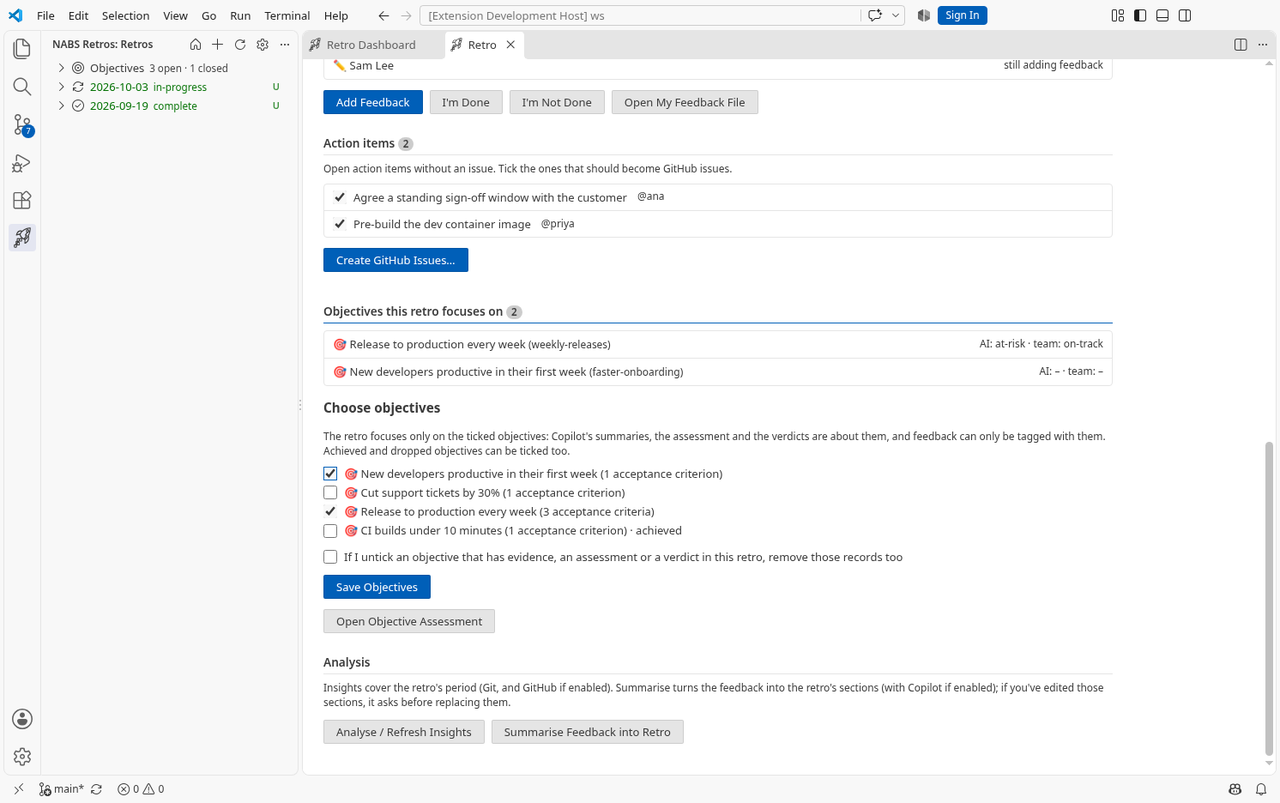
- Run NABS Confidence: Create GitHub Issues for Action Items…, or open the Retro panel at Action items. The tree has the same command on the retro and on its Action items node.
- Tick the items. Ones that do not already have an issue start ticked.
- Click Create GitHub Issues… and confirm in the panel. It names the repository and the label, and it says that everyone with access to the repository can see the issues.
One issue is created per ticked item. The label defaults to retro-action (nabsConfidence.actionItemLabel), and it is created in the repository if it is missing. The issue links back to the retro. The action line gains a link of the form ([#N](url)). Items that already have an issue are skipped. This needs a github.com origin remote and the GitHub sign-in VS Code already uses. GitHub Enterprise is not supported.
Check them next time
NABS Confidence: Update Action Items from GitHub ticks an action whose issue is closed, and unticks it if the issue is reopened. A new retro carries the previous retro’s actions forward and does this update itself. On the next retro they show as previous action items, using the issue’s state rather than only the checkbox you left behind.
Open Action Item on an entry in the tree opens the issue. The archive’s Decide comment lists the same items with those links, as text rather than as GitHub checkboxes, so nobody ticks them on the Discussion by mistake.